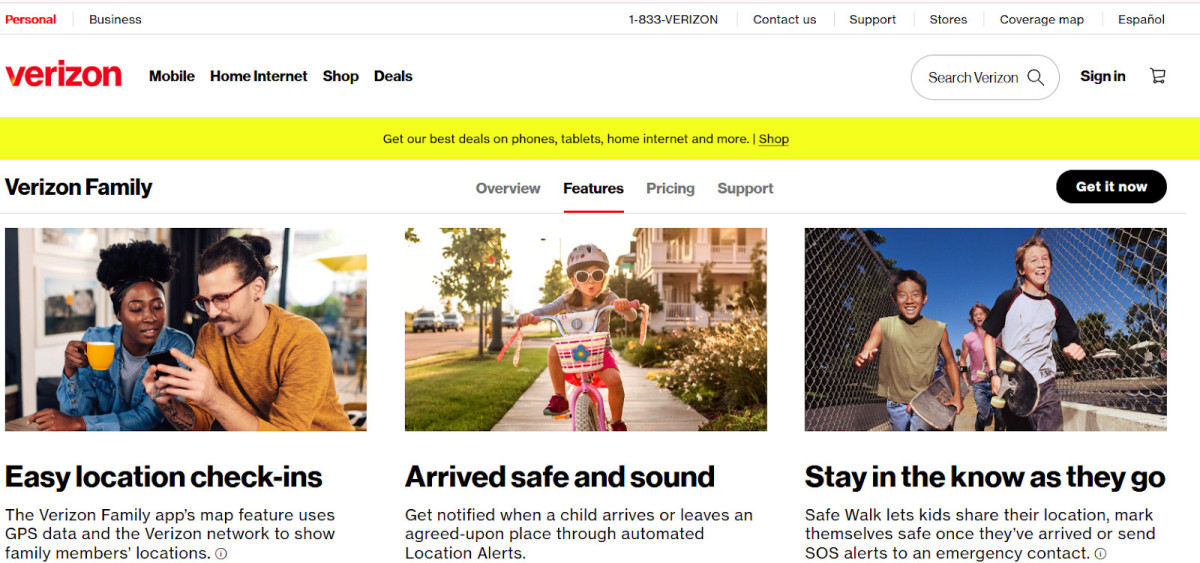
Did you know that if you have a Verizon Family plan, you can track your children’s live location through the Verizon Family app? The Verizon Family app not only allows for seamless location sharing but also offers additional features. For example, you can get live alerts when your child leaves or arrives at agreed-upon locations, such as school or a grandparent’s house.
Here is how to track a phone on Verizon.
Requirements, Roles, and Consent
To track your children’s location using the Verizon Family app, you need to have a Verizon Family plan.
Next, you need to pair your child’s device to your own. To do that, download the Verizon Family app and sign in to the app using your Verizon ID or phone number.
On the app, go to the Family Profiles tab and click on the Invite button. Then, create a new profile and select a role (Dependant for children under 18, and Member for children over 18). Then, type in their phone number.
Set Up Verizon Smart Family Step by Step
Once you have created a profile, open the Verizon Family Companion app on your child’s device and click on Get Started. To confirm the device, you will need to enter a six-digit code sent to the device and click on Confirm.
Follow the on-screen prompts to agree to the terms and conditions, allow access to data sharing, and finish the setup. Make sure location sharing is enabled.
GPS should also be enabled on the companion device. However, even if it’s not enabled, you can still see location updates, which are provided based on cellular signals from your child’s device, although these may be slightly less accurate than GPS signals.
See Real-Time Location Updates

To see your child’s location, open the Verizon Family Guardian app on your device. Click on the Home tab and then on the map, which will display all of your family members on the map. You can then select them from the menu below to see their real-time location.
You may also see their location history below the map and be able to refresh their location by tapping on the refresh icon in the lower right.
Create Places and Alerts (Geofencing)
Did you know that you can also create “safe places” and get alerts when your child leaves an agreed-upon safe place or arrives there safely? Here’s how to do that:
- Open the app on your phone and click on the Locations tab.
- In the Saved Locations section, tap View All and click on Add New Saved Location.
- Add information about the location, including the address and a name.
- Add optional boundary limits and set the radius using the slider. You can then select the family member you want to be alerted about when they leave or enter these boundary limits.
- Click on Save.
Use Platform Finders for Lost Devices
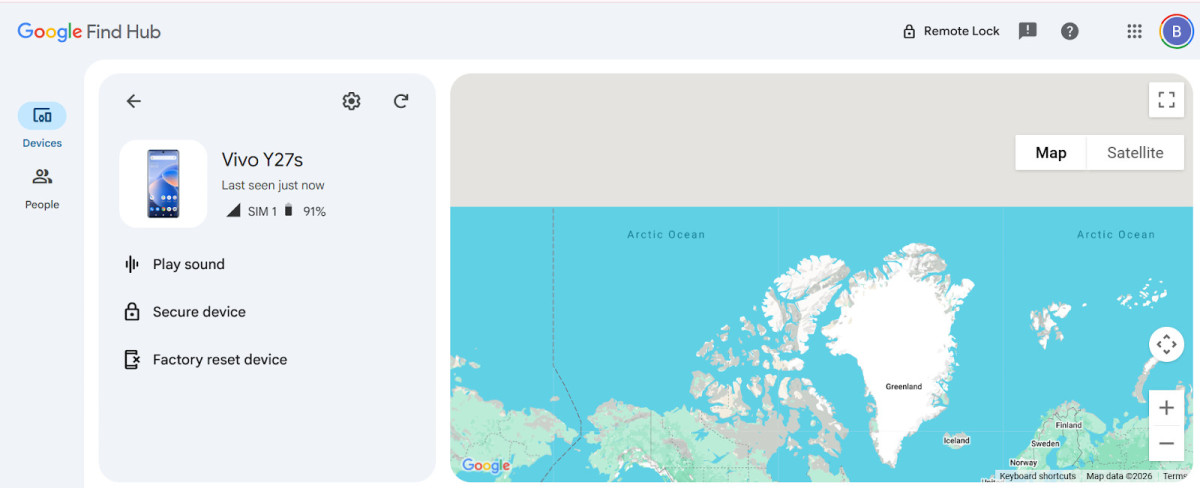
Verizon Family is designed primarily to keep track of family members and allow for parental controls. However, if you lost a device, you can find it with built-in platform finders.
On iOS, this is called Find My. Make sure to enable it in your settings by going to Settings> [Your Name] > Find My and toggling it on. Turn on Find My Network and Send Last Location as well.
Once that’s done, you can always locate your iPhone by signing into icloud.com/find or using the Find My app.
On an Android, go to google.com/android/find/ and sign in to see your device’s location. Make sure it’s turned on by going to Settings > Security & privacy > Find My Device and toggling it on.
If the phone is lost or stolen on Verizon
If your phone was lost or stolen, go to this page and click on Suspend Service to temporarily suspend service and prevent unauthorized use of your phone. Make sure to reconnect with a new device within 30 days to avoid potentially losing your number.
You can also click on File a Claim to help you replace your device if you have an insurance plan such as Verizon Mobile Protect.
Troubleshoot Location Not Updating
If your child’s location is not updating on Verizon Family, it could be that their phone is off. GPS may also be turned off on their phone. While it should still provide tracking through wireless signals, it may not provide the precise location without GPS.
Make sure your child doesn’t have a VPN installed, as VPNs can cause location issues. Turn off Battery Saver on your child’s device to ensure Verizon Family can run properly. Update the app and the operating system, and re-pair the companion app if needed.
Costs, Compatibility, and Limits
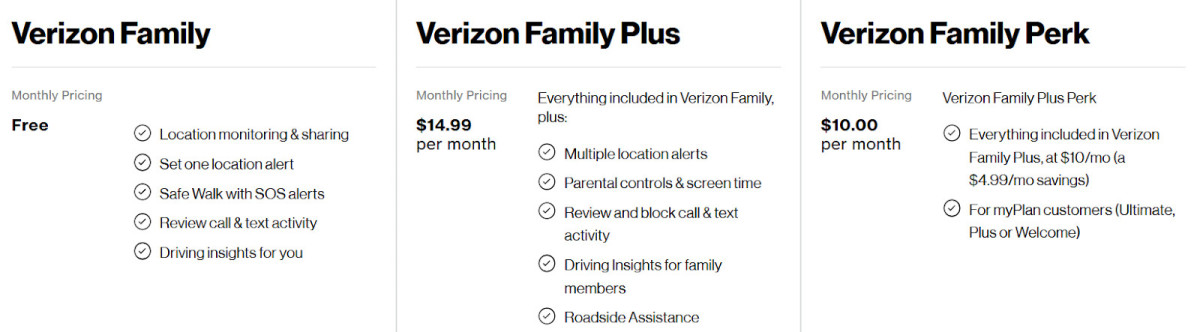
Verizon Family is free if you have a Family plan. The free version includes location monitoring and sharing, only one location alert, Safe Walk with SOS alerts, driving insights for the plan owner only, and the ability to review your child’s calls and texts without blocking numbers.
Verizon Family Plus costs $14.99/month and includes multiple location alerts, parental controls, screen time controls, driving insights for family members, the ability to block calls and texts, Verizon Roadside Assistance, and more. This plan costs just $10/month if you have a Verizon myPlan phone plan.
Business Use: Fleets and Assets

Verizon Connect is a fleet management service, perfect for delivery companies and other companies in the transport industry.
Verizon also provides a service called Verizon Connect, which provides live asset tracking for business use, including real-time fleet GPS tracking and live heavy equipment tracking.
It allows fleet managers to see where all vehicles are in real time and even track idling, poor driving behavior, and more. Business plans are available for a variety of business needs.
Conclusion
Verizon Family is a great tool for keeping your family safe, providing accurate updates on your children’s locations and geofence alerts to ensure they are not wandering to unsafe locations. Setting up Verizon tracking is fairly easy and straightforward, but remember to also set up Find My or Google’s location tracking tool if you also want to be able to locate lost or stolen devices.