
Apple’s iOS is known for its stringent security measures, one of which is the signing process. This process ensures that only authorized and verified software can be installed on iOS devices such as iPhones. Recently, Apple made some visual tweaks and introduced new features to the platform with iOS 17. However, it’s important to note that once a new iOS version is released, Apple stops signing older versions after a certain period of time.
Today, we’ll focus on the signing process and its implications for iOS users. When Apple releases a new version of iOS, it keeps signing the previous version for a short period. This means that users have the option to downgrade to the previous iOS version if they are not satisfied with the latest update. However, once Apple stops signing a specific iOS version, downgrading to that version becomes impossible.
In this case, Apple has recently stopped signing iOS 16.6.1, which was the last available update before iOS 17. This means that if you have already upgraded to iOS 17 and are not satisfied with it, you can no longer downgrade to iOS 16.6.1. The signature for obsolete versions of iOS is typically deleted around two weeks after the release of the latest system update.
It’s worth noting that you can still upgrade or downgrade to any iOS version that is currently being signed by Apple. However, once a specific version is no longer signed, you won’t be able to install it on your device. Apple follows this practice to prevent users from downgrading to older software versions, ensuring that devices are running on the most up-to-date and secure software.
Looking ahead, iOS 17.1 is expected to be released later this month. As with any new iOS version, it’s important to consider the new features and improvements it brings before deciding to upgrade. Once you upgrade to iOS 17.1, it’s essential to keep in mind that downgrading to a previous version will no longer be possible once Apple stops signing it.
The signing process is a crucial aspect of Apple’s iOS security mechanism. It ensures that only authorized and verified software can be installed on iOS devices. While you have the flexibility to upgrade or downgrade to signed iOS versions, it’s important to be aware that once a version is no longer signed, downgrading becomes impossible. Apple’s practice of stopping signing older iOS releases over time helps maintain device security and encourages users to stay up-to-date with the latest software.
What Is Signed IOS?
Signed iOS refers to the process of digitally signing iOS software by Apple. This signing process is an essential part of Apple’s security mechanism for iOS devices, such as iPhones.
When an iOS software is signed, it means that it has been verified and authorized by Apple. Only signed software can be installed on iOS devices, ensuring that users are protected from potentially harmful or unauthorized software.
Here’s a breakdown of the signing process and its importance:
1. Digital Signature: When Apple releases a new version of iOS or an app update, it is digitally signed using a unique cryptographic signature. This signature is created using Apple’s private key, which can only be decrypted and verified by Apple’s public key.
2. Verification Process: When a user attempts to install or update an app on their iOS device, the device verifies the digital signature of the software using Apple’s public key. This ensures that the software has not been tampered with or modified by unauthorized sources.
3. Trust Chain: The verification process also involves a trust chain, where the device checks the validity of the digital signature at each step. This chain includes verifying the authenticity of the developer’s certificate, the app’s certificate, and the root certificate authority.
4. App Store Distribution: The App Store is the primary distribution platform for iOS software. Apple reviews and verifies all apps submitted to the App Store to ensure they meet their guidelines and do not pose any security risks. Once approved, these apps are signed by Apple before being made available for download on iOS devices.
The signing process serves multiple purposes:
– Security: By only allowing signed software to be installed, Apple ensures that iOS devices are protected from malware, viruses, and unauthorized apps that could compromise user data or privacy.
– Authenticity: The digital signature verifies the authenticity of the software and its source. Users can trust that the software they are installing is legitimate and has not been tampered with.
– Control: Apple maintains control over the iOS ecosystem by requiring all software to be signed by them. This allows them to enforce their guidelines, prevent unauthorized distribution, and maintain a consistent user experience.
Signed iOS refers to the process of digitally signing iOS software by Apple to ensure security, authenticity, and control over the iOS ecosystem. It is an essential aspect of iOS device security, protecting users from unauthorized or malicious software.
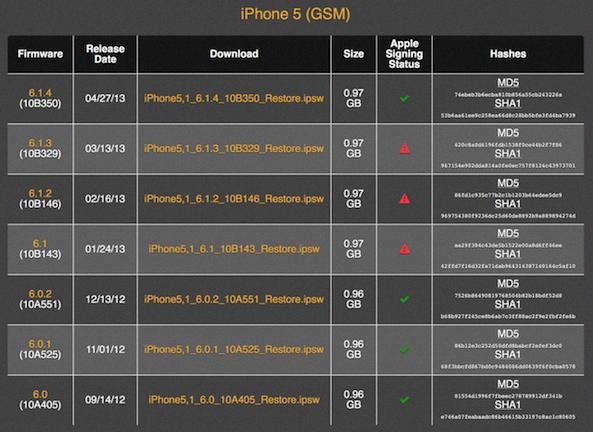
Is IOS 16 No Longer Signed?
It is true that iOS 16.6.1 is no longer being signed by Apple. This means that users who have updated to iOS 17 cannot downgrade back to iOS 16. If you are not satisfied with iOS 17 and would like to revert to the previous version, unfortunately, that is no longer possible.
When Apple stops signing a particular iOS version, it means that they are no longer allowing users to install or restore that specific version of the operating system on their devices. This is a common practice by Apple as they encourage users to stay on the latest version of iOS for security and performance reasons.
By discontinuing the signing of iOS 16.6.1, Apple is effectively preventing users from downgrading to that version. This ensures that users are using the most up-to-date software that includes bug fixes, security patches, and new features.
It is important to note that once Apple stops signing a specific iOS version, it becomes increasingly difficult to find and install that version on your device. This is because Apple’s servers no longer recognize it as a valid and authorized version of the operating system.
If you have already updated to iOS 17 and are not satisfied with it, you will need to wait for Apple to release a new update or bug fix to address any issues you may be experiencing. Alternatively, you can reach out to Apple Support for assistance or explore other troubleshooting options to address any specific problems you are facing.
IOS 16.6.1 is no longer being signed by Apple, meaning users cannot downgrade from iOS 17 to iOS 16. It is important to stay on the latest version of iOS for security and performance reasons, and if you are not satisfied with the current version, you will need to wait for future updates or seek support from Apple.
What Does It Mean When An IOS Version Is No Longer Signed?
When an iOS version is no longer signed, it means that Apple has stopped authorizing the installation or downgrade to that particular version of iOS on your device. This occurs when Apple releases a newer version of iOS and wants to ensure that users are using the latest and most secure software.
Here are the implications of an iOS version no longer being signed:
1. Inability to install: If you want to install an older version of iOS that is no longer signed, you won’t be able to do so. Apple’s servers will reject the installation request, and you’ll receive an error message.
2. Limited downgrade options: If you have already updated to a newer version of iOS and want to go back to the previously signed version, you won’t be able to do it if that version is no longer signed. You can only downgrade to a version that Apple is currently signing.
3. Security concerns: Apple regularly releases updates to address security vulnerabilities and improve the overall stability of iOS. When an iOS version is no longer signed, it means that Apple will no longer provide security patches and updates for that particular version. This leaves your device more vulnerable to potential security threats.
4. App compatibility: As newer versions of iOS are released, app developers often update their apps to ensure compatibility with the latest operating system. If you are using an older version of iOS that is no longer signed, you may encounter compatibility issues with certain apps, as they may require a newer version of iOS to function properly.
To stay up-to-date with the latest features, security enhancements, and app compatibility, it is generally recommended to use the latest version of iOS that is currently signed by Apple.
Is IOS 16.7 Still Being Signed?
IOS 16.7 is no longer being signed by Apple. Apple regularly stops signing older versions of iOS in order to prevent users from downgrading to previous software releases. This means that if you have already updated your device to a newer version of iOS, you will not be able to revert back to iOS 16.7. It is important to note that Apple’s decision to stop signing older iOS versions is a common practice to ensure that users are using the most up-to-date and secure software.
Conclusion
The signing process for iOS versions plays a crucial role in ensuring the security and integrity of Apple devices. By only allowing authorized and verified software to be installed, Apple can protect users from potential threats and vulnerabilities.
Apple regularly updates and releases new versions of iOS, introducing visual tweaks and new features to enhance the user experience. However, as part of their security measures, Apple stops signing older iOS releases over time. This means that users can no longer downgrade to previous versions of iOS once they are no longer signed.
The recent discontinuation of iOS 16.6.1 signing by Apple means that users can no longer downgrade from iOS 17 to iOS 16. This limitation prevents users from reverting to older versions of iOS, even if they are not satisfied with the latest update.
It’s important to note that the signature for obsolete iOS versions is deleted two weeks after the release of the latest system update. This practice ensures that users are encouraged to stay up to date with the latest iOS version, which typically includes important security patches and bug fixes.
While it may be frustrating for some users who prefer older iOS versions or encounter issues with the latest release, Apple’s decision to stop signing older versions ultimately helps maintain the security and stability of their devices. Users can still upgrade or downgrade to any iOS version that is currently signed, but they should be aware that once a version is no longer signed, it is no longer possible to install or downgrade to that specific version.
The signing process for iOS versions is an important aspect of Apple’s commitment to user security, ensuring that only verified and authorized software can be installed on their devices.
Related posts:
 How to Use the iPhone Home Button Double Tap Feature?
 How to Customize Your iPhone with Anime App Icons?
 Exploring the Inverted Colors Feature on the iPhone
 Exploring the Convenience of Double Tap to Wake on Android Devices
 How to Troubleshoot AirPlay Issues on Roku Devices?
 How To Update From iCloud
 Why Your iPhone Charging Port Isn’t Working?
 How To Underline Text On Phone
